WRN Store Monitor
WooCommerce Operational Monitoring, Alerting & AI-Assisted Diagnosis
Skills applied to this project
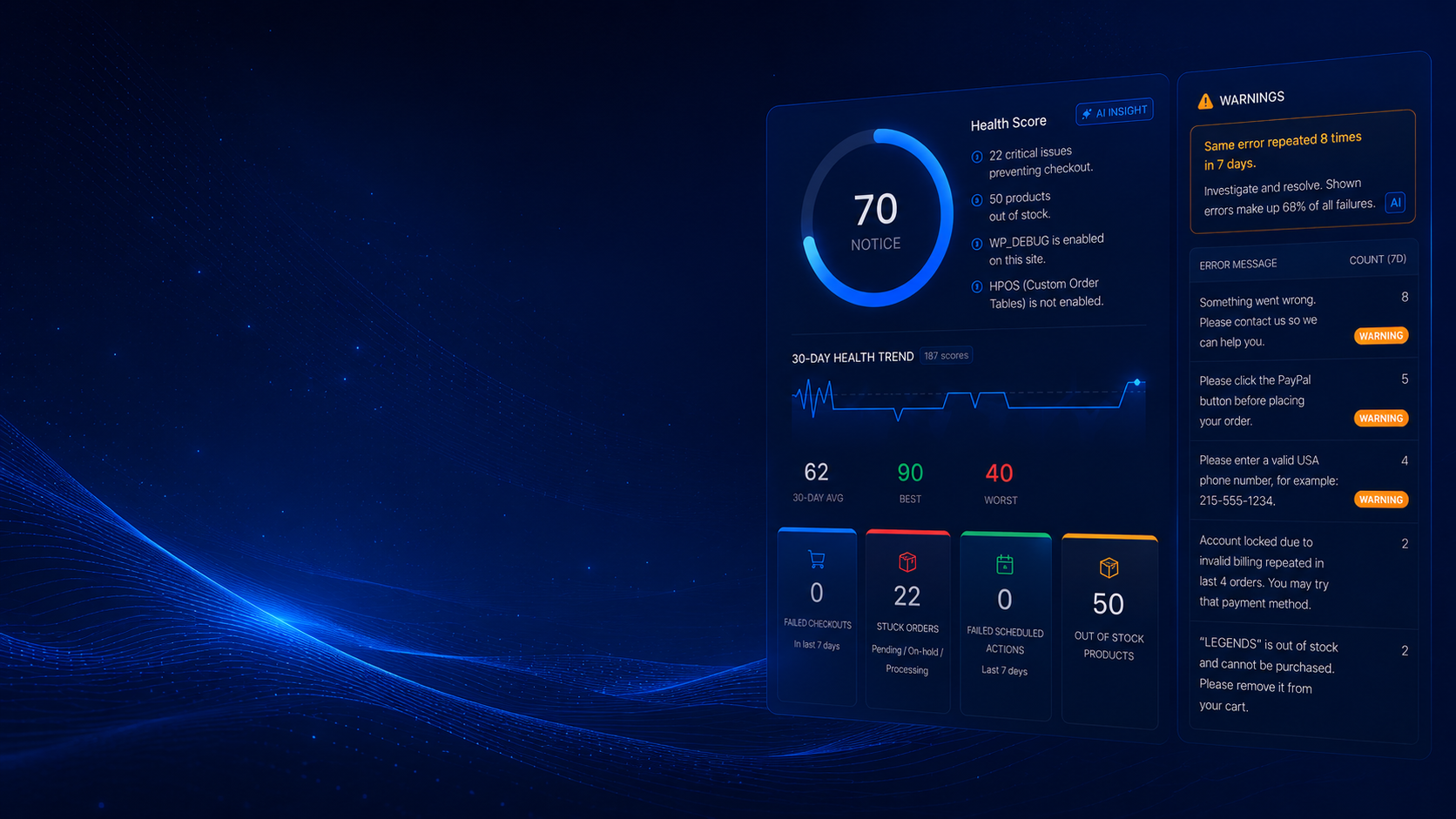
WRN Store Monitor is a WooCommerce monitoring plugin I designed, built, and published to WordPress.org. It helps store owners detect operational problems earlier — failed and stuck orders, payment failure patterns, checkout configuration issues, inventory gaps, and environment risks — and surfaces them on a single health dashboard with alerting and AI-assisted triage.
What was the problem?
Most WooCommerce problems happen silently in the background — a payment gateway misconfigured, orders stuck in processing, checkout throwing errors only customers see. Standard uptime monitors report that the homepage is "up" while the store is quietly losing orders, and owners often find out days later from customer complaints. There was no lightweight, WooCommerce-aware way to catch these operational signals early.
How I solved it
I built WRN Store Monitor to run WooCommerce-aware health scans on a schedule. It checks order flow, payment failures, checkout and cart availability, WooCommerce AJAX health, order-received endpoints, inventory, and environment diagnostics (PHP/WooCommerce/WordPress versions, active gateways, HPOS). It logs diagnostic events with timestamps, stores a snapshot of evidence on every scan, sends email and Slack alerts when configured thresholds are crossed, and logs every alert delivery attempt so owners can verify what was sent. A Pro tier adds continuous checkout probing and AI-assisted triage using the store's own Anthropic key, with human verification always required.
Measurable results
Store owners get early, WooCommerce-aware visibility into operational issues instead of hearing about them from frustrated customers. Alerts and a diagnostic timeline reduce the time it takes to understand what changed and when. The Lite version is free and published on WordPress.org; the Pro version powers WebReadyNow's managed monitoring work.
- Published free on WordPress.org after passing plugin review
- Detects failed/stuck orders, payment failure patterns, and checkout/inventory issues from one dashboard
- Email and Slack alerts fire when configured thresholds are crossed
- Every alert delivery attempt logged so owners can verify what was sent and when
- Incident timeline records order status changes, payment events, checkout errors, and scan evidence
- Pro tier adds continuous checkout probing and AI-assisted triage (human verification required)
Technical highlights
- Scheduled WooCommerce health scans via Action Scheduler
- Checkout, cart, and WooCommerce-AJAX availability probes
- Email and Slack alerting with per-alert delivery logging in a custom DB table
- Diagnostic evidence layer: per-scan snapshot of severity, issue counts, and an environment fingerprint
- Incident timeline aggregating orders, payments, checkout errors, and alerts
- AI-assisted triage via the Anthropic API (bring-your-own key), human verification required
- HPOS-compatible; licensing and updates delivered through my own WRN Hub platform
My process applied to this project
-
Diagnose
Understand the real business problem, user flow, and technical constraints before touching code.
-
Plan
Choose the cleanest technical approach, identify dependencies, and define what success looks like.
-
Build
Create custom WordPress/PHP solutions, plugins, integrations, or automations using best practices.
-
Test
Validate edge cases, staging behavior, logs, checkout flows, order statuses, and user roles.
-
Deploy
Release carefully with rollback awareness, staging verification, and clear documentation.
-
Improve
Monitor, optimize, and refine based on real usage, client feedback, and production behavior.
Tech used in this project
How AI accelerated this work
AI tools helped me review error logs, trace query patterns, and generate diagnostic hypotheses in minutes rather than hours — so I could focus on fixing, not searching.
I used AI to audit integration logic, catch silent failure paths, and validate that custom hooks would hold up under different WooCommerce states before going live.
AI-assisted documentation made the final plugin handoff clear and actionable for the client's internal team — reducing support questions after delivery.
Have a similar challenge?
I help e-commerce teams solve the technical problems that cost them time and revenue. Let's talk about yours.
Related projects